Receives
Mailboxes, alarm receivers, backend platforms and webhooks, on the protocols panels and CMS platforms already speak.
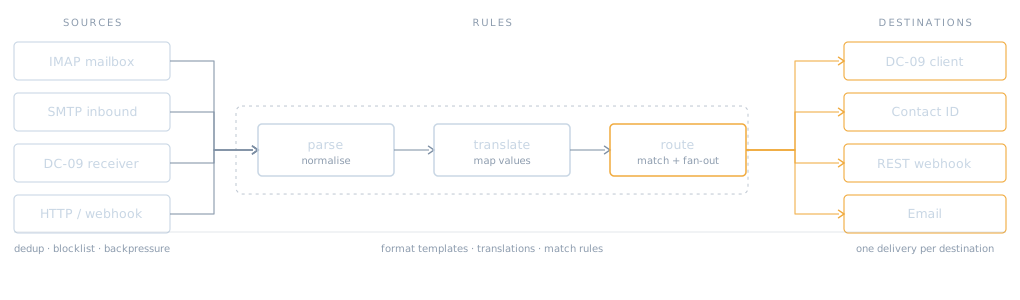
AlarmCommand is a signal broker for central monitoring stations. It takes signals from mailboxes, alarm receivers, platforms and webhooks, normalises them into one shape, applies your routing and translation rules, and delivers them onward in whatever protocol the destination speaks.
Most monitoring centres end up with a pile of one-off scripts: a mailbox parser here, a forwarder there, a script that rewrites account numbers for one customer. Each was written once, by someone who has since left, and none of them tell you what happened to a signal.
AlarmCommand replaces that with one pipeline you can inspect. Every signal keeps what arrived, what it was understood as, what it was translated to, and what each destination did with it.
Mailboxes, alarm receivers, backend platforms and webhooks, on the protocols panels and CMS platforms already speak.
Whatever arrives becomes one envelope: account, area, zone or user, event code, timestamp, media.
Match rules decide where a signal goes. One signal can fan out to several destinations at once.
Each destination gets its own delivery record, retried on its own, with the outcome kept.
Received, understood as, translated, sent. Four stages you can read back for any signal.
Scripted traffic runs through the same pipeline, so a test proves the real path works.
A source is a way in. Each one is a transport plus a format: an IMAP mailbox that is polled, an SMTP address that receives directly, a TCP port listening for DC-09, or a platform pushing over HTTP.
Format templates do the extraction. A template says where the account, area, zone or user, port and event code sit in that particular upstream's messages, so a new provider is a template rather than code.
from     Jesse Love <jesse@example.com>
subject  1-98 Valley Road - Cam 1 : Intrusion Zone

account     1-98 Valley Road
zone_user   Cam 1 : Intrusion Zone
port        01
event_code  Intrusion Zone
area        BASE

parsed with  Camera Integration Test
Translations turn what the upstream said into what the destination expects. A site name becomes an account number, a camera name becomes a zone, a text description becomes an event code. Each translation records which rule fired, so an unexpected value is traceable rather than mysterious.
Routes decide where the signal goes. A route matches on the signal after normalisation and can fan out to several destinations, each of which gets its own delivery. Adding a second recipient does not disturb the first.
account     1-98 Valley Road   -> 1234   literal, rule 1
zone_user   Cam 1 : Intrusion  -> 1      literal, rule 3
event_code  Intrusion Zone     -> 130    literal, rule 2

routed to   Staging  ·  attempt 1  ·  HTTP 200
A destination is a codec plus a transport. The same DC-09 implementation drives the outbound client and the inbound receiver, so a framing problem shows up in tests rather than in one direction only.
Every delivery is its own record: which destination, which attempt, what came back. Retries do not overwrite history, and a destination that is down does not hold up the others.
POST /api/v3/signals/logFormattedSignal
{
  "clientNo" : "1234BASE01",
  "typeNo"   : 130,
  "zoneUser" : 1,
  "moduleNo" : 0
}

delivery 1 of 2  ·  accepted
delivery 2 of 2  ·  DC-09  ·  ACK
Camera-triggered alarm mail carries snapshots. AlarmCommand stores them against the signal and, where the destination supports it, raises each one as its own picture event of a configured type, so the image reaches the operator rather than sitting in a mailbox.
Attachments are stored against the signal they arrived with, and shown alongside it.
Each picture can become its own event of a configured type, delivered through the same routes.
Logos, signature graphics and tracking pixels repeat on every message. Repeats are identified and left out so they do not bury the real images.
When a file is not kept, the reason is recorded on the signal. "Why is there no picture" has an answer.
If a signal has no account to log against, the files are still stored rather than discarded.
Large attachments are handled without stalling the signal they belong to.
The DC-09 implementation is checked against the worked examples published in ANSI/SIA DC-09-2013, including the encrypted vector, rather than against whatever a particular receiver happened to accept.
SIA-DCS with and without timestamp, ADM-CID, open and close, MAC extended data, and the encrypted example.
DC-09 encryption per the specification, with keys held encrypted at rest.
ACK only after the signal is committed, retransmissions acknowledged without duplicating, NAK carrying our time when a timestamp is out of window.
A parameter is a zone, a user or an area depending on the event. It is decoded as what it actually is, not assumed to be a zone.
Scripted traffic runs through the real pipeline, so commissioning a new customer is a rehearsal rather than a hope.
Each customer runs their own instance and database. One customer's load or misconfiguration cannot reach another's.
Which upstreams you receive from, which platforms you deliver to, and what the scripts in between are doing today. That is usually enough to say whether this fits.